GRun for Amazfit
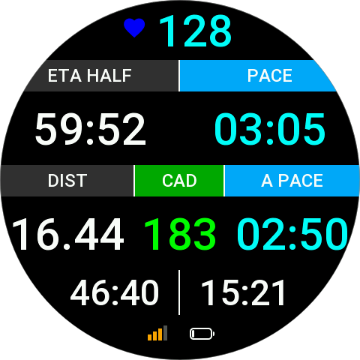
An advanced running data widget for Amazfit / ZeppOS. Track 40+ metrics at a glance—pace, HR, cadence, distance, plus lap data and training effect (when supported).
Built with clean, responsive layouts for different screen shapes and color-coded HR zones for quick feedback.
How to Install
Open the Zepp app → App Store → search "GRun" → install.
Tell me your favorite data fields and device model!
Why GRun?
40+ Metrics
Configure over 40 data fields including Heart Rate, Pace, Speed, Altitude, and Power.
Visual Zones
Color-coded Heart Rate and Pace zones provide instant visual feedback during your run.
Universal Layout
Smart layout engine adapts perfectly to both round and square watch faces.
Training Effect
Monitor Aerobic/Anaerobic benefits and Training Load in real-time.
Fully Custom
Easy-to-use settings page to tailor every data field to your training needs.
Data Fields That Matter
Core Running
- Time & Timer
- Distance
- Pace & Avg Pace
- Speed & Avg Speed
- Calories
Performance
- Heart Rate & Avg HR
- HR Zone & Time Offset
- Cadence & Avg Cadence
- Training Effect (TE)
- Power & Avg Power
- Stride Length (Current/Avg)
Lap Data
- Lap Time & Dist
- Lap Pace & Stride
- Prev Lap Time/Dist/Pace
- Lap Count
Environment & System
- Altitude
- Total Ascent / Descent
- Battery Level
- GPS Accuracy
ETA Targets ⓘ
- ETA Lap
- ETA 5K / 10K
- ETA Half / Marathon
- ETA 50K / 100K
Required Pace ⓘ
- Req. 5K / 10K Pace
- Req. Half / Full Pace
- Req. 50K / 100K Pace
Installation Guide for GRun on Amazfit
Watch this quick tutorial to get started
Supported Devices
GRun works on Amazfit smartwatches running Zepp OS. Check if your device is compatible below.
System Requirement
GRun requires Zepp OS API Level 3.6 or higher. This is a firmware limitation — older devices cannot run GRun even with updates.
Supported Devices
| Device | API Level | Zepp OS | Screen | Resolution |
|---|---|---|---|---|
| Amazfit Active Max | 4.2 | 5.0 | Round | 480 x 480 |
| Amazfit T-Rex 3 Pro (44mm) | 4.2 | 5.0 | Round | 466 x 466 |
| Amazfit T-Rex 3 Pro (48mm) | 4.2 | 5.0 | Round | 480 x 480 |
| Amazfit Active 2 (Square) | 4.2 | 5.0 | Square | 390 x 450 |
| Amazfit Balance 2 | 4.2 | 5.0 | Round | 480 x 480 |
| Amazfit Bip 6 | 4.2 | 5.0 | Square | 390 x 450 |
| Active 2 (Round) | 4.2 | 5.0 | Round | 466 x 466 |
| Amazfit T-Rex 3 | 4.0 | 4.5 | Round | 480 x 480 |
| Amazfit Balance | 3.7 | 4.0 | Round | 480 x 480 |
| Amazfit Active | 3.6 | 4.0 | Square | 390 x 450 |
| Amazfit Cheetah (Square) | 3.6 | 3.5 | Square | 390 x 450 |
| Amazfit Cheetah Pro | 3.6 | 3.5 | Round | 480 x 480 |
| Amazfit Cheetah (Round) | 3.6 | 3.5 | Round | 454 x 454 |
| Amazfit T-Rex Ultra | 3.6 | 3.5 | Round | 454 x 454 |
| Amazfit Falcon | 3.6 | 3.5 | Round | 416 x 416 |
Unsupported Devices
These devices have API Level below 3.6 and cannot run GRun due to firmware limitations.
| Device | API Level | Zepp OS | Screen | Resolution |
|---|---|---|---|---|
| Amazfit Active Edge | 3.5 | 3.5 | Round | 360 x 360 |
| Amazfit GTR 4 | 3.5 | 3.5 | Round | 466 x 466 |
| Amazfit GTS 4 | 3.5 | 3.5 | Square | 390 x 450 |
| Amazfit Bip 5 Unity | 3.0 | 3.0 | Square | 320 x 380 |
| Amazfit Bip 5 | 2.1 | 2.1 | Square | 320 x 380 |
| Amazfit T-Rex 2 | 2.1 | 2.1 | Round | 454 x 454 |
| Amazfit GTR Mini | 2.0 | 2.0 | Round | 416 x 416 |
| Amazfit GTS 4 mini | 1.0 | 1.0 | Square | 336 x 384 |
| Amazfit GTR 3 Pro | - | 1.0 | Round | 480 x 480 |
| Amazfit GTR 3 | - | 1.0 | Round | 454 x 454 |
| Amazfit GTS 3 | 1.0 | 1.0 | Square | 390 x 450 |
| Amazfit Band 7 | 1.0 | 1.0 | Band | 194 x 368 |
| Amazfit GTR 2 | - | - | Round | 454 x 454 |
| Amazfit GTR 2e | - | - | Round | 454 x 454 |
| Zepp E (Round) | - | - | Round | 416 x 416 |
| Zepp E (Square) | - | - | Square | 348 x 442 |
| Amazfit T-Rex Pro | - | - | Round | 360 x 360 |
| Amazfit Pop | - | - | Square | 302 x 320 |
| Amazfit GTS 2 mini | - | - | Square | 306 x 354 |
Want to try GRun?
Tell us your favorite data fields and device model!